 61bc42b728
This is something like ~60% faster than old version. |
3 years ago | |
|---|---|---|
| proto | 3 years ago | |
| src | 3 years ago | |
| .gitignore | 3 years ago | |
| Cargo.lock | 3 years ago | |
| Cargo.toml | 3 years ago | |
| LICENSE | 3 years ago | |
| LICENSE.third_parties | 3 years ago | |
| README.md | 3 years ago | |
| build.rs | 3 years ago | |
| rllama.png | 3 years ago | |

README.md
RLLaMA
This is my attempt at making the LLaMA language model working on a pure Rust CPU implementation. I was inspired by an amazing CPU implementation here: https://github.com/ggerganov/ggml that could run GPT-J 6B models.
With my crappy OpenCL, this will do around ~240ms on my GTX 3090 per token. With pure CPU on Ryzen 3950X and OpenCL, I can get around 700ms per token. And without any OpenCL, pure Rust code only, with some of my handwritten AVX2 intrinsics, about 1 second per token. All on LLaMA-7B.
(Scroll to the bottom to see some benchmarks)
I've also managed to run LLaMA-13B which just barely fits in my 64-gig machine with 32-bit float weights everywhere.
I've managed to run LLaMA-30B on a 128 gigabyte server and it gets around 4 seconds per token using CPU OpenCL for Ryzen 5950X.
I have not tried LLaMA-60B but presumably if all the smaller models work it would run given a sufficiently chonky computer.
It also has a Python unpickler that understands the .pth files used by
PyTorch. Well almost, it doesn't unzip them automatically (see below).
How to run
You will need Rust. Make sure you can run cargo from a command line. In
particular, this is using unstable features so you need nightly rust. Make sure
that if you write cargo --version it shows that it is nightly Rust.
You will need to download LLaMA-7B weights. Refer to https://github.com/facebookresearch/llama/
Once you have 7B weights, and the tokenizer.model it comes with, you need to
decompress it.
$ cd LLaMA
$ cd 7B
$ unzip consolidated.00.pth
# For LLaMA-7B, rename consolidated to consolidated.00
# For the larger models, the number is there already so no need to do this step.
$ mv consolidated consolidated.00
You should then be ready to generate some text.
cargo run --release -- --tokenizer-model /path/to/tokenizer.model --model-path /path/to/LLaMA/7B --param-path /path/to/LLaMA/7B/params.json --prompt "The meaning of life is"
Right now it seems to use around ~25 gigabytes of memory for 7B and around ~50 gigabytes for 13B. If you don't use OpenCL, then internally all parameters are cast to 32-bit floats.
You can use --temperature, --top-p and --top-k to adjust token sampler
settings.
There is --repetition-penalty setting. 1.0 means no penalty. This value
likely should be between 0 and 1. Values smaller than 1.0 give a penalty to
tokens that appear in the context, by
x*(repetitition_penalty^num_occurrences) before applying softmax() on the
output probabilities. Or in other words, values smaller than 1.0 apply penalty.
You can also use --prompt-file to read the prompt from a file instead from
the command line.
How to turn on OpenCL
Use opencl Cargo feature.
cargo run --release --features opencl -- --tokenizer-model /path/to/tokenizer.model --model-path /path/to/LLaMA/7B --param-path /path/to/LLaMA/7B/params.json --prompt "The meaning of life is"
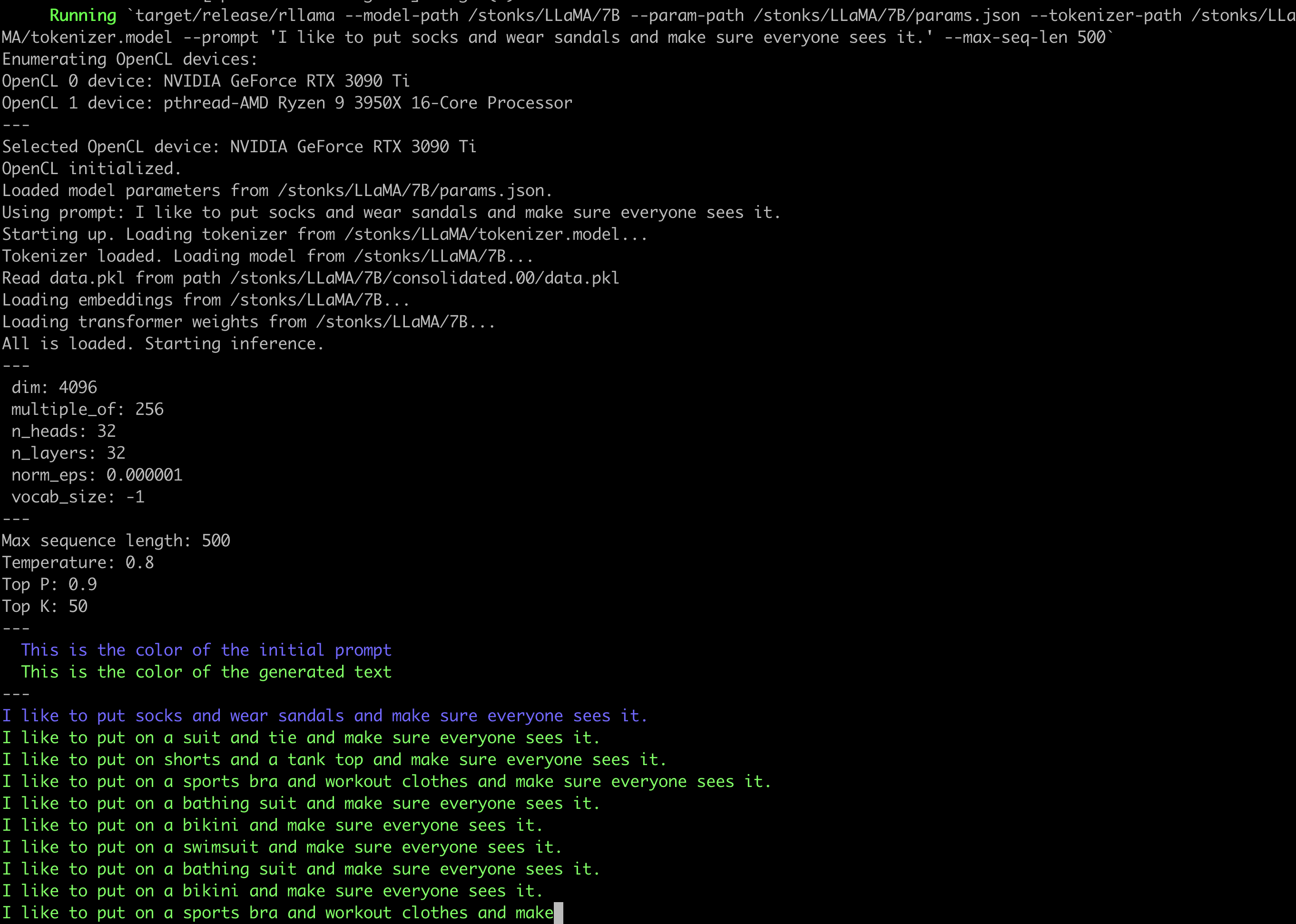
With opencl feature, there is also another argument, --opencl-device that
takes a number. That number selects Nth OpenCL device found on the system. You
can see the devices in the output when you run the program (e.g. see the
screenshot below).
Screenshot
Notes and future plans
This is a hobby thing for me so don't expect updates or help.
- Some other CPU implementations use quantization to reduce the size of weights and generally speed up everything a lot.
- Put some of the operations on the OpenCL GPU/CPU. I've made some initial OpenCL code for matrix multiplications but the performance is not competetive with frameworks like PyTorch on GPU.
- I've heard there is some thing called Tensor Cores on nVidia GPUs. Not accessible with OpenCL. But might be accessible on Vulkan with a an extension.
- More sophisticated token sampling. I saw on Hackernews some comments how the samplers included in Facebook's reference code are kinda garbage and you can get much better results with good defaults and things like repetition penalty.
- There is an initial start-up time as the program has to pass through the initial prompt. I don't know if this start-up time can be eliminated completely but it could be cached on disk. Use cases like having a standard prompt to prime the text generation that you reuse many times.
- Stanford released some instruct-finetuned LLaMA-7B, once I find the weights then I'd like to try make a chat-like command-line interface.
Benchmarks
I'm trying to track that I'm making this faster and not slower.
For 50-length sequence generation:
cargo run --release --
          --model-path /LLaMA/13B \
          --param-path /LLaMA/13B/params.json \
          --tokenizer-path /LLaMA/tokenizer.model \
          --prompt "Computers are pretty complica" --max-seq-len 50

# commit c9c861d199bd2d87d7e883e3087661c1e287f6c4  (13 March 2023)

LLaMA-7B:  AMD Ryzen 3950X: 1058ms / token
LLaMA-13B: AMD Ryzen 3950X: 2005ms / token

# commit 63d27dba9091823f8ba11a270ab5790d6f597311  (13 March 2023)
# This one has one part of the transformer moved to GPU as a type of smoke test

LLaMA-7B:  AMD Ryzen 3950X + OpenCL GTX 3090 Ti:  567ms / token
LLaMA-7B:  AMD Ryzen 3950X + OpenCL Ryzen 3950X:  956ms / token
LLaMA-13B: AMD Ryzen 3950X + OpenCL GTX 3090 Ti:  987ms / token
LLaMA-13B: AMD Ryzen 3950X + OpenCL Ryzen 3950X:  1706ms / token

# commit 35b0c372a87192761e17beb421699ea5ad4ac1ce  (13 March 2023)
# I moved some attention stuff to OpenCL too.

LLaMA-7B:  AMD Ryzen 3950X + OpenCL GTX 3090 Ti:  283ms / token
LLaMA-7B:  AMD Ryzen 3950X + OpenCL Ryzen 3950X:  679ms / token
LLaMA-13B: AMD Ryzen 3950X + OpenCL GTX 3090 Ti:  <ran out of GPU memory>
LLaMA-13B: AMD Ryzen 3950X + OpenCL Ryzen 3950X:  1226ms / token

# commit de5dd592777b3a4f5a9e8c93c8aeef25b9294364  (15 March 2023)
# The matrix multiplication on GPU is now much faster. It didn't have that much
# effect overall though, but I got modest improvement on LLaMA-7B GPU.
LLaMA-7B:  AMD Ryzen 3950X + OpenCL GTX 3090 Ti:  247ms / token
LLaMA-7B:  AMD Ryzen 3950X + OpenCL Ryzen 3950X:  680ms / token
LLaMA-13B: AMD Ryzen 3950X + OpenCL GTX 3090 Ti:  <ran out of GPU memory>
LLaMA-13B: AMD Ryzen 3950X + OpenCL Ryzen 3950X:  1232ms / token
LLaMA-30B: AMD Ryzen 5950X + OpenCL Ryzen 5950X:  4098ms / token